
COMPRESS TO A SIZE · WINDOWS DESKTOP APP
Make a PDF smaller than a size you choose, on your own PC.
Need it under 2 MB for an email or an upload form? Type the size and Pagekind uses the gentlest picture compression that gets there, then saves a new copy. If the size cannot be reached without removing content it tells you so. The file never leaves your computer.
- Free to install. No account, no card
- Your PDF stays on your PC. Nothing is uploaded
- Works offline on Windows 10 & 11 (64-bit)
What installing includes
- The Pagekind PDF tools. Free, and your PDFs stay on your PC.
- An optional connection-sharing component, preselected in Setup. Optional connection sharing is off by default. It stays off until you read the full notice inside Pagekind and agree. Setup only copies its files, including a network driver. If you turn it on, it sends third-party traffic through your public IP, even while Pagekind is closed. You can turn it off any time. Sharing details.
- An unsigned release. Unsigned release: Windows may warn before setup opens. Installation details and checksum.
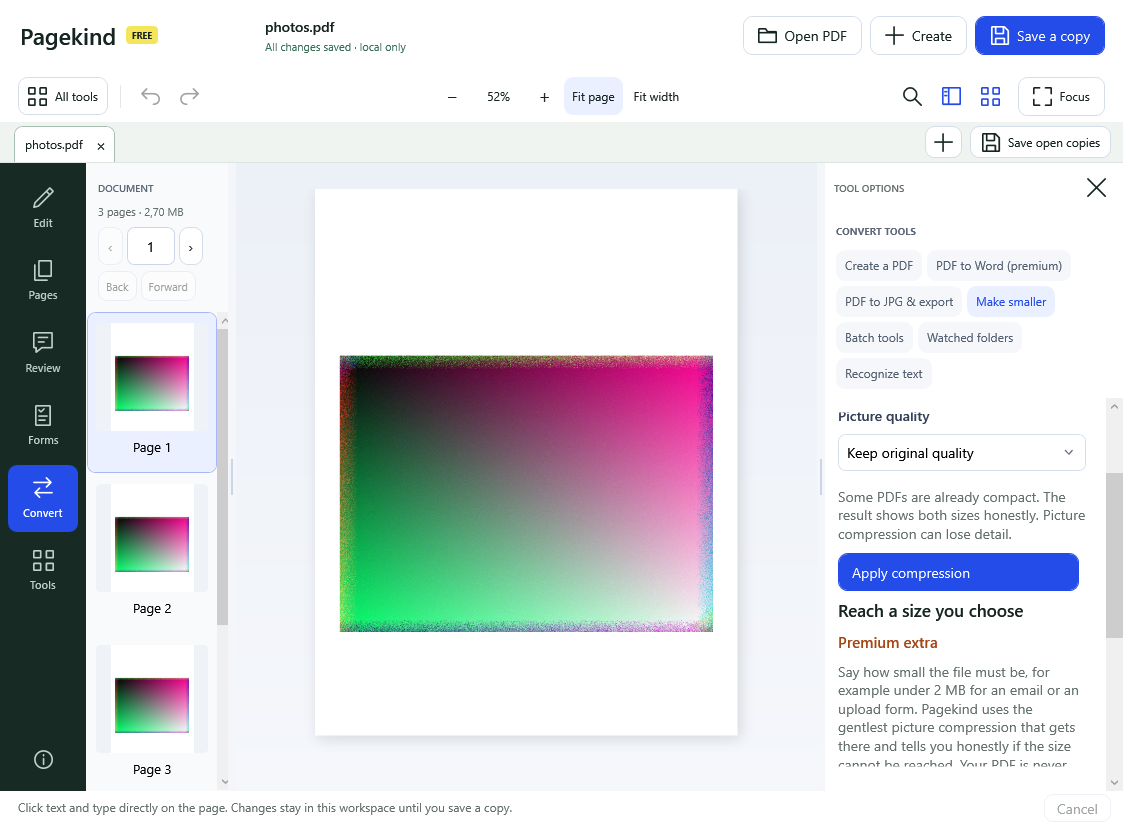
Before you download: this is a premium extra
Reaching a size you choose is a premium extra: one of three extras in Compress, Merge and Split. Like PDF to Word and the other premium tools it unlocks for 180 days if you choose optional connection sharing: while sharing is on, Pagekind’s operator can send other people’s internet traffic through your connection, websites see your public IP address, and that can continue even while Pagekind is closed. You read the full notice and decide before anything is enabled, and turning sharing off locks premium again. Ordinary compression with a picture-quality choice stays free.
How it works in Pagekind
- 1
Open your PDF
Choose Open PDF or drop the file onto Pagekind. A PDF with a password needs that password first.
- 2
Choose Convert, then Make smaller
Under Reach a size you choose, type the size you need, for example 2 MB or 500 KB. The extra is premium, so the first time it shows what unlocking involves and asks you to decide.
- 3
Save the smaller copy
Pick a new file name. Pagekind tries lossless cleanup first, then recompresses pictures a little at a time and stops at the first result that fits. Your original is never changed and an existing file is never overwritten.
What you get
- A size target in KB or MB instead of guessing at a quality setting
- The gentlest compression that fits: lossless cleanup first, then pictures a step at a time
- A copy that is saved even if the target cannot be reached, with the smallest size it found
- No pages or text removed
- A password-protected PDF stays protected
- Your PDF is processed locally; there is no upload service
Good to know
- Reaching a small size usually means recompressing pictures, so they can lose some detail. Check the copy before you send it.
- A PDF that is mostly text has little to shrink. If the size cannot be reached, Pagekind says so and saves the smallest copy it could make.
- Scans and photo-heavy PDFs shrink the most. Pictures stored in less common ways, such as CMYK or one-bit images, are left as they are.
- Very large files can take a few minutes, because Pagekind may try several compression steps.
Questions
Is compressing to a target size free?
Ordinary Make smaller, with a choice of picture quality, is free. Reaching a size you choose is a premium extra. It unlocks for 180 days if you choose optional connection sharing, which lets Pagekind's operator send internet traffic through your connection. You see the full notice first and can turn sharing off at any time, which locks premium again.
Will it lower the quality of my pictures?
Only as much as it has to. Pagekind starts with a lossless cleanup and only recompresses pictures, a step at a time, if the first result is still too big. It stops at the first copy under your size.
What if my PDF cannot get that small?
Pagekind saves the smallest copy it reached and tells you the size, so you can choose a larger target. It never removes pages or text to reach a number.
Is my PDF uploaded to compress it?
No. Pagekind compresses on your PC. Optional connection sharing is about your internet connection, not your documents; Pagekind has no document-upload service.
Does it work offline?
Yes. Compressing needs no internet connection.