
MERGE PDF · WINDOWS DESKTOP APP
Combine PDFs into one on your PC.
Put several PDFs into one file in the order you choose, and check the pages before you save. Free, offline, and your files are not uploaded.
- Free. No account, no card, no watermark
- Your PDF stays on your PC. Nothing is uploaded
- Works offline on Windows 10 & 11 (64-bit)
Unsigned release: Windows may warn before setup opens. Installation details and checksum. Optional connection sharing is off by default; when you turn it on it sends third-party traffic through your public IP, even while Pagekind is closed. Sharing details.
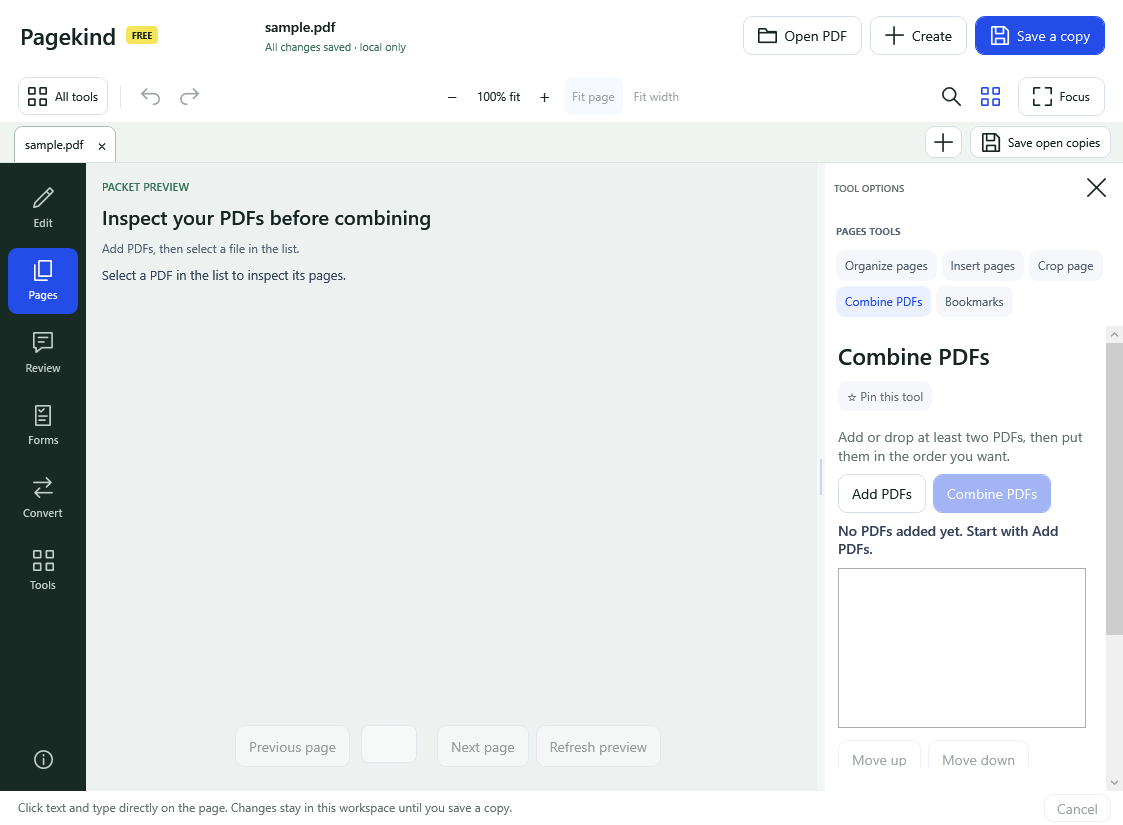
How it works in Pagekind
- 1
Choose Pages, then Combine PDFs
Add at least two PDFs, or drop them onto the workspace.
- 2
Arrange the order and check each file
Move a file up or down. Select a file to see its pages before you combine.
- 3
Combine and save a copy
Check the page count and order, then save under a new name. Your original files stay as they were.
What you get
- Any number of PDFs in the order you choose
- Preview each file's pages before combining
- Insert only some pages from another PDF
- Reorder, rotate, crop or delete pages afterwards
- Free: no account, no watermark, no upload
Good to know
- A PDF with a password needs an unlocked copy before it can be combined; Pagekind asks.
- Combining does not make the file smaller. Use Make smaller for that.
- Check the final page order before you send the packet.
Questions
Is combining PDFs free?
Yes. Combine PDFs is one of Pagekind's free tools.
Is there a page or file-size limit?
This release has no paid page or file-size limit; very large files depend on your PC's memory and speed.
Does it change the original files?
No. You save a new combined PDF.
Can I combine only some pages of a PDF?
Yes. Use Insert pages to add a page range from another PDF.
Are my PDFs uploaded?
No. Pagekind combines them on your PC.