
COMPRESS PDF · WINDOWS DESKTOP APP
Make a PDF smaller on your PC.
Reduce a PDF's file size with a choice of picture quality, then check the before and after sizes. Free, offline, and your file is never uploaded.
- Free. No account, no card, no watermark
- Your PDF stays on your PC. Nothing is uploaded
- Works offline on Windows 10 & 11 (64-bit)
Unsigned release: Windows may warn before setup opens. Installation details and checksum. Optional connection sharing is off by default; when you turn it on it sends third-party traffic through your public IP, even while Pagekind is closed. Sharing details.
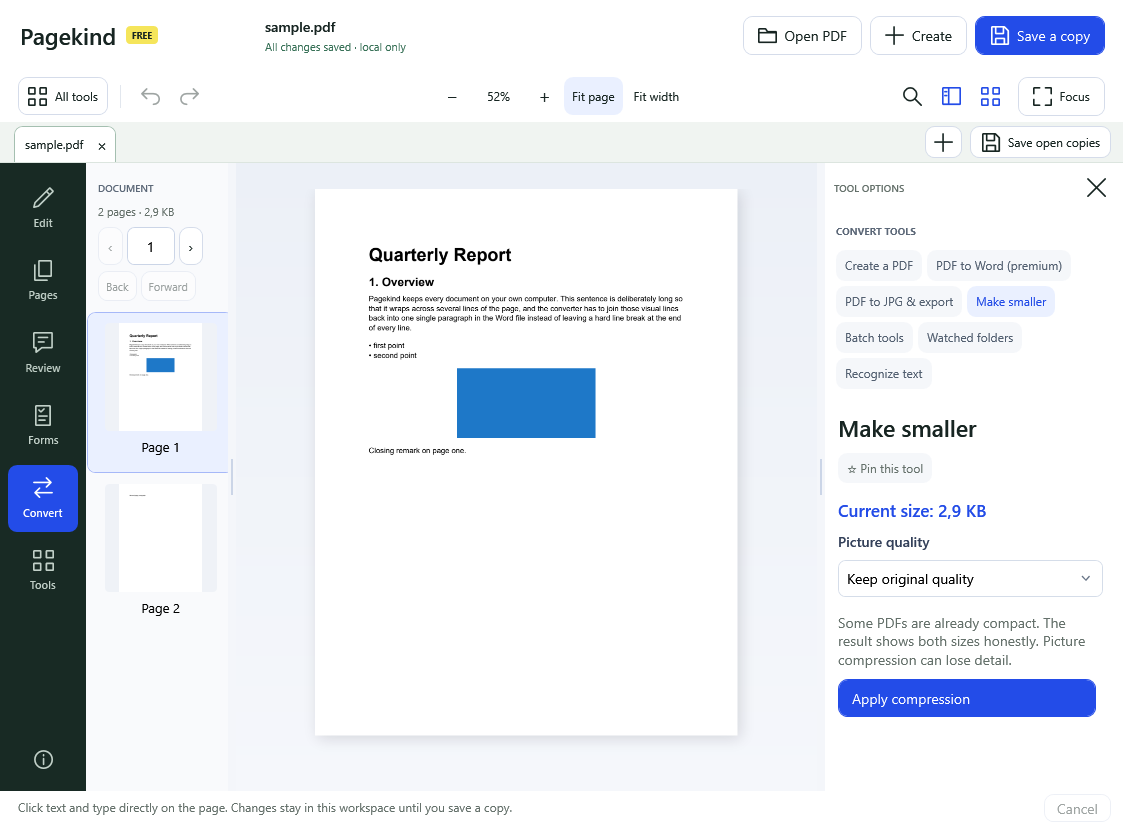
How it works in Pagekind
- 1
Open your PDF
Choose Open PDF or drop the file onto Pagekind.
- 2
Choose Convert, then Make smaller
The tool shows the current size. Choose Keep original quality, Smaller pictures (75%) or Smallest pictures (45%).
- 3
Apply and save a copy
Pagekind reports both sizes, including when the result is not smaller. Save it under a new name; your original stays as it was.
What you get
- Three levels, from no picture loss to smallest
- Shows the size before and after, even when it did not help
- Works on your PC, with no upload
- Batch tools can do the same to several PDFs at once
- Free: no account, no watermark
Good to know
- Some PDFs are already compact, and a result can be about the same size.
- Picture compression loses detail. Keep original quality avoids that setting.
- Pagekind does not promise a target size such as 100 KB.
Questions
Is it free to compress a PDF with Pagekind?
Yes. Make smaller is one of the free tools.
Will compressing change my original file?
No. You save a new copy and the original is unchanged.
Why did my PDF barely shrink?
Many PDFs have little to remove. Text and vector drawings are already compact; most of the savings come from pictures.
Can I compress many PDFs at once?
Yes. Convert, then Batch tools lets you add PDFs, choose compression and an output folder.
Is my PDF uploaded?
No. Compression happens on your PC.